
How to choose the right IT asset management software
Choose the best ITAM software to meet your needs with our practical checklist of 16 considerations.
Last updated
August 21, 2026

Are you bringing in an IT asset management (ITAM) platform for the first time, or replacing your existing system? Wondering how to choose the best IT asset management software for your organization?
Choosing the right ITAM software can have a significant impact on how effectively your organization manages its IT assets, controls costs, and stays compliant. But there are several factors to consider beyond the annual price and list of features.
Below, we cover the key questions to ask yourself (and your shortlist of IT asset management software vendors) when evaluating your options, alongside examples of how Setyl approaches each one.
Use this practical IT asset management platform evaluation guide to choose the best solution to meet your needs today and continue to support you as your organization scales and your requirements evolve.
IT asset management software evaluation checklist:
- What types of IT assets does the platform support?
- Does it cover the full asset lifecycle?
- Does the tool include dedicated software asset management?
- Does it integrate with your existing systems?
- Does the platform include an agent, or is it agentless?
- How quickly can it be implemented?
- How much of the work is automated?
- How much training does it require?
- Is it easy for non-technical and remote teams to use?
- What reporting and analytics are available?
- Does it help you stay audit-ready?
- What security, privacy, and compliance controls does the software have?
- How is it priced?
- Can it help you reduce IT spend and deliver ROI?
- What support and customer success services are included?
- Who is the ITAM platform built for?
1. What types of IT assets does the platform support?
Does your shortlisted IT asset management software limit the types of assets you can manage? Can you manage hardware and software in the same platform? Can you track physical equipment beyond traditional IT assets, or would you need additional tools or spreadsheets?
Some ITAM solutions focus primarily on endpoints, while others support a much broader range of hardware, peripherals, software, subscriptions, and other equipment.
Ideally, you want one platform that can accommodate the full range of assets you need to manage, rather than maintaining separate systems for different asset types.
Consider both your current requirements and what you may need to manage as your organization grows. It is also worth checking whether there are limits on the number of assets, users, or asset types you can add.
For example, the Setyl IT asset management platform lets you manage both hardware and software assets, alongside other physical equipment and service contracts — from employee access keys and office furniture, to phone contracts and rental agreements. Setyl also includes unlimited hardware and software assets across its plans, so asset volume does not determine whether you need a separate inventory system.
2. Does it cover the full asset lifecycle?
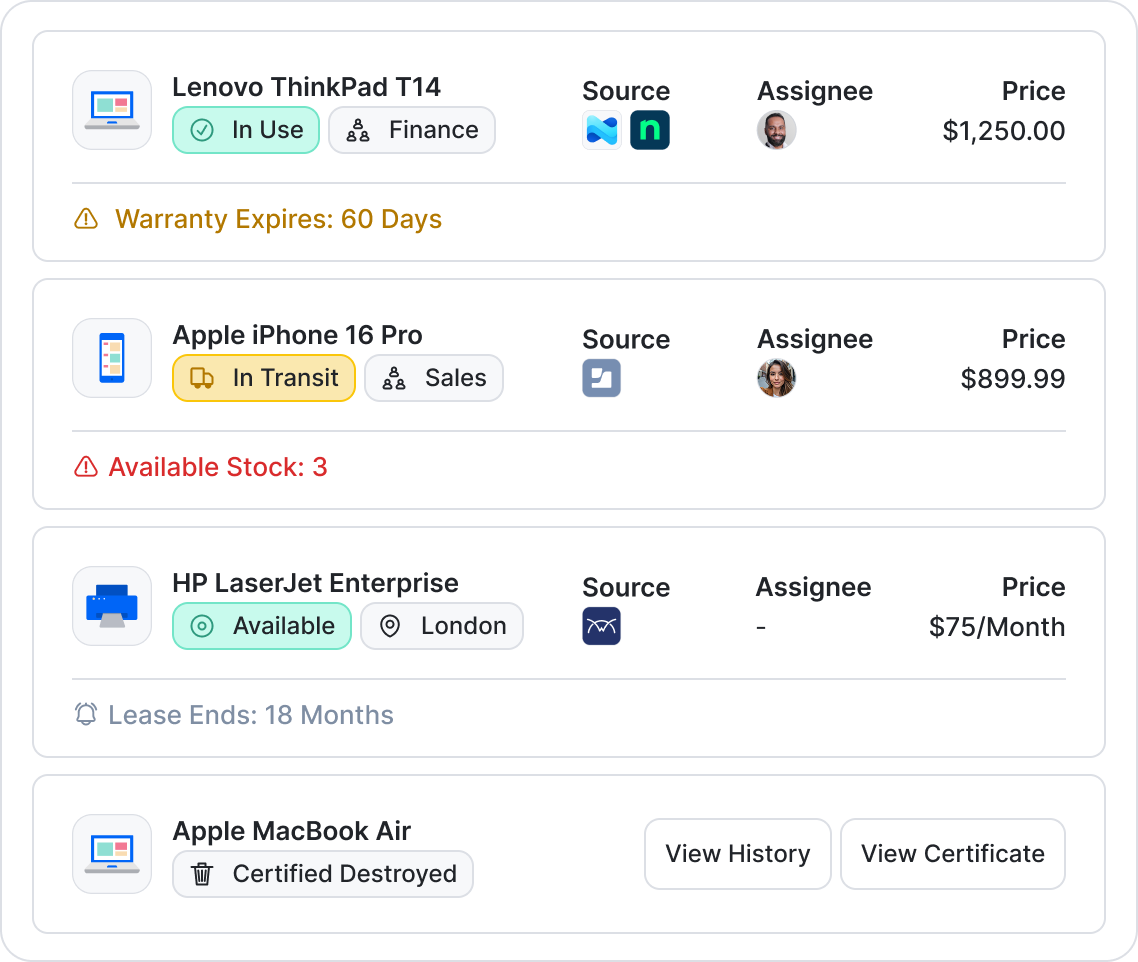
Does the ITAM tool simply provide an inventory, or does it help you manage what happens to an asset throughout its lifecycle? Can you track an asset from purchase to disposal? Does the software proactively alert you to upcoming lifecycle stages that require attention?
Depending on your requirements, look for the ability to record and manage:
- Purchase information, including price, purchase order, vendor, and documentation
- Assignment to employees, departments, entities, and locations
- Warranty and lease information
- Depreciation and useful life
- Status and usage
- Maintenance and inspections
- Replacement and renewal dates
- Recovery during employee offboarding
- Disposal and destruction records
- A complete activity and change history
The key question is whether your chosen solution remains useful after an asset has been added to the inventory. The best IT asset management system should help manage the operational processes around an asset, not just record that it exists.
For example, Setyl supports the full lifecycle of hardware and software assets, from purchase and assignment through replacement and disposal. Detailed activity logs provide a history of changes, while archiving preserves historical asset records rather than deleting them — particularly important for audit and compliance requirements. Automated insights also help you take proactive actions, avoiding reactive firefighting.
3. Does the tool include dedicated software asset management?
If you are choosing an ITAM solution that covers both hardware and software, is software asset management a core capability of the platform or an add-on to hardware management?
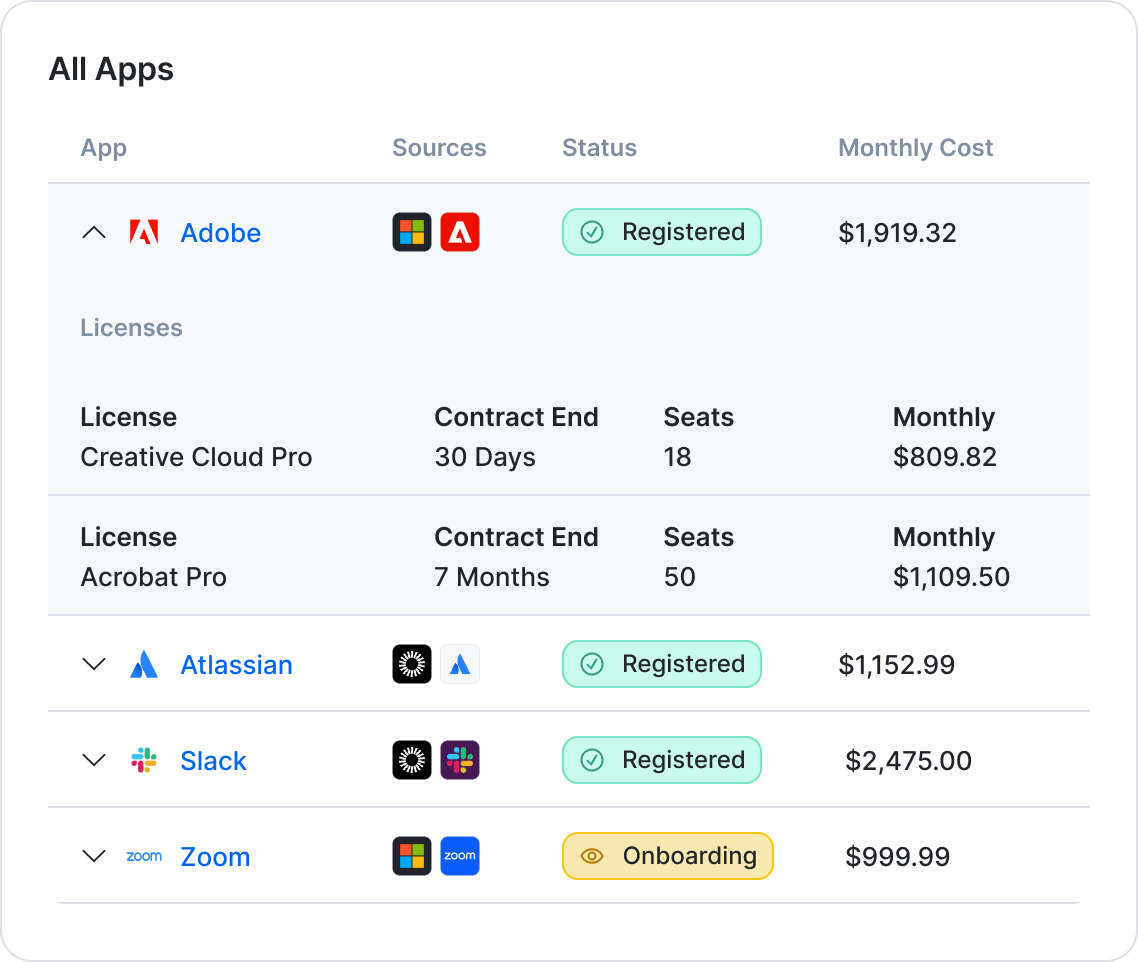
Software asset management should go beyond maintaining a list of applications. Check for capabilities covering the full lifecycle of software and licenses, including:
- Software, license, and SaaS subscription inventory
- Contract and spend information
- License assignments and usage
- Renewal tracking and reminders
- License rightsizing
- Vendor details
- Security and compliance information
- Joiner, mover, and leaver processes
- Identification of unused or unassigned licenses
It is also worth checking where the software usage data comes from. Manually maintained license records can quickly become outdated, so integrations with Microsoft, Google, Okta, identity, SSO, and other systems and business applications are important.
For example, Setyl provides dedicated software asset management features for SaaS applications, software licenses, subscriptions, and contracts, including through dedicated system integrations. It tracks assignments, renewals, usage, costs, vendors, and security information, and automatically surfaces insights such as unused licenses and potential savings opportunities.
4. Does it integrate with your existing systems?
Can your selected IT asset management software connect to the systems you already use, or will your team have to duplicate information manually? Can it combine information from multiple sources and keep that data synchronized? Are integrations available out-of-the-box?
Your asset information is likely already distributed across Microsoft or Google, HR systems, MDM and RMM tools, identity and access management platforms, cybersecurity tools, and other applications. The aim should not be to move all that information into another database manually.
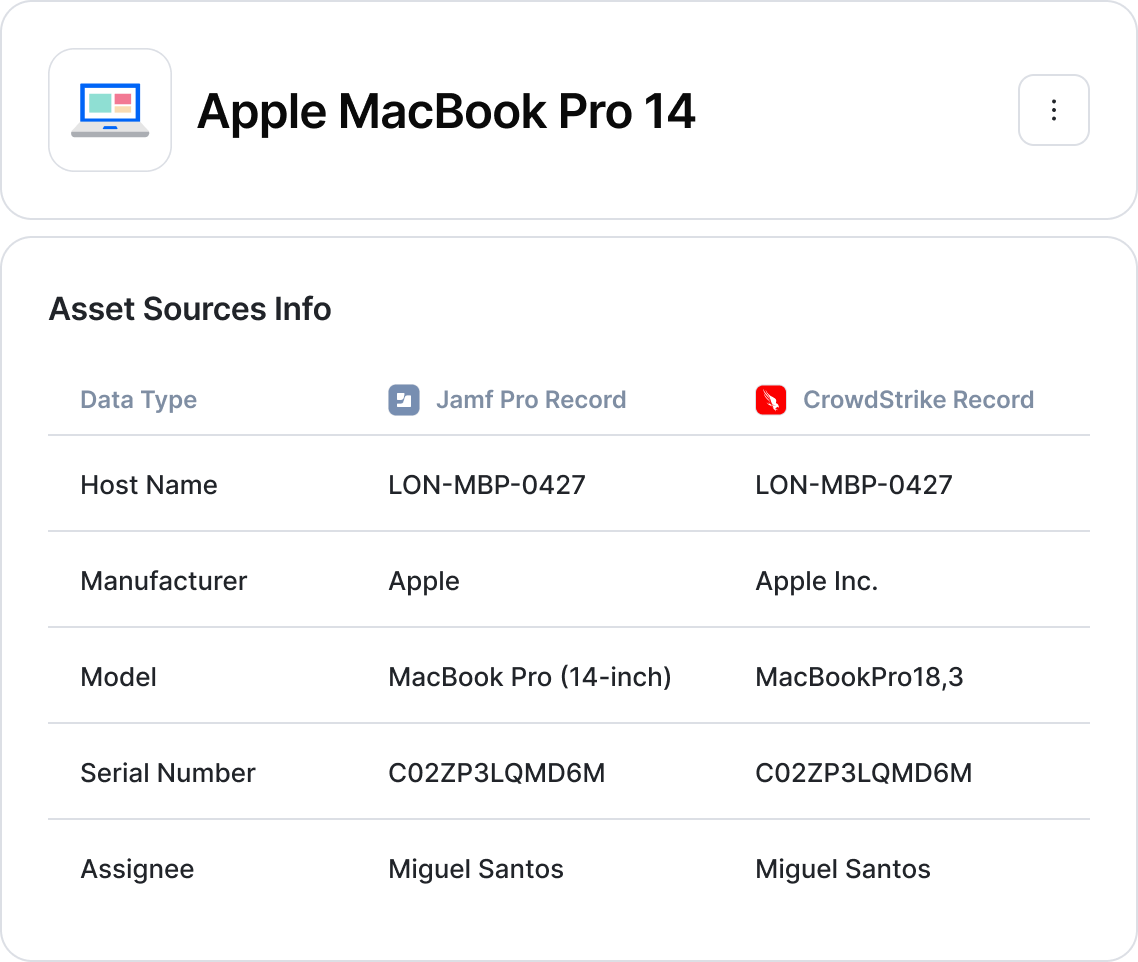
Instead, choose an ITAM tool that integrates with your existing systems, simplifying implementation through automated data import and providing a dynamic source of data over the long term.
Additional considerations when choosing ITAM software include whether multiple sources can contribute information about the same asset or person, whether API access is available for systems that don’t have a native integration, and whether the solution supports newer integration approaches, such as MCP for AI applications.
For example, the Setyl platform offers over 100 native integrations covering Microsoft, Google, MDM, RMM, cybersecurity, IAM, HR, service desks, and other systems, alongside API access and an MCP connector for compatible AI platforms. Setyl can combine data from multiple sources, which you can prioritize by setting integration hierarchies. The platform then automatically merges duplicate records and maps data to create a centralized source of truth.
5. Does the platform include an agent, or is it agentless?
Does the IT asset management platform require you to deploy another agent across your endpoints? If you already have MDM, RMM, cybersecurity, identity, and other discovery tools in place, can the ITAM software use those existing sources instead?
Adding another endpoint agent can introduce additional deployment, maintenance, security, and administrative overhead. It may also duplicate functionality that your existing tools already provide.
That does not mean agents are always a problem. In some environments, a dedicated agent may provide useful discovery or monitoring capabilities. The important question is whether the approach fits your existing technology stack and operating model.
For example, Setyl connects to existing MDM, RMM, IAM, SSO, and other asset, software, and people systems to automatically import information, allowing you to use the tools you already have rather than introducing another discovery layer.
6. How quickly can it be implemented?
How long does it take to get from signing the contract to having useful, live asset data and insights? Does implementation require specialist technical resources, consultants, or a dedicated team of people?
Implementation time can vary considerably between ITAM tools. Evaluate what is actually required to get started:
- How much configuration is required, or is the software largely plug and play?
- How is existing asset data migrated?
- How easy is it to connect integrations, and are they ready to use or do they require additional configuration?
- How much internal IT time and technical expertise should be allocated?
- Is implementation support included from the vendor side?
- Can you start using the platform before every configuration detail is finalized?
A fast implementation can also make it easier to test whether your chosen IT asset management tool works for your organization before committing significant time and resources.
For example, you can be up and running with Setyl in around one hour. Native integrations, an intuitive interface, and support from the Setyl team help minimize configuration and implementation effort, allowing you to start using the platform quickly without dedicating extensive resources.
7. How much of the work is automated?
Does the platform actually reduce manual ITAM work? Does it automate routine tasks and proactively alert you to issues that require your attention? Or is the tool essentially a glorified spreadsheet?
A strong IT asset management solution uses integrations, workflows, alerts, and automation to keep information current and trigger actions without requiring someone to constantly update and review records manually.
Look for automation around areas such as:
- Asset discovery and inventory updates
- Employee onboarding and offboarding
- Asset assignment and recovery
- Warranty and lease expiration
- End-of-life reminders
- Software renewals
- License usage and rightsizing
- Login detection
- Employee asset surveys
- Maintenance and inspection reminders
- Missing or incomplete information alerts
- Reporting and spend analysis
For example, Setyl automatically imports and updates asset, software, and employee information through its integrations. Rule-based workflows can also automate processes around onboarding and offboarding, asset assignment and recovery, employee surveys, reminders, warranty and end-of-life tracking, software renewals, and other recurring ITAM processes — reducing the need for repetitive manual administration.
8. How much training does it require?
Will your team need extensive training to use the platform day-to-day? Or can they pick it up quickly?
A steep learning curve slows adoption and adds hidden cost, even if the platform itself is affordable. The more time your team spends learning how to use the software, the longer it can take to realize its value.
Consider how easy the software is to navigate, how intuitive the interface feels, and how much you can figure out yourself during a trial.
For example, Setyl is designed to have little to no learning curve, allowing IT teams to get started quickly with minimal training.
9. Is it easy for non-technical and remote teams to use?
Can people outside the core IT team use the software without extensive training? Can IT collaborate on the platform with HR, finance, procurement, security, department heads, and local teams?
ITAM data often needs input from, or needs to be accessible to, people outside IT or in different locations. An IT asset management tool that only technical specialists can comfortably use makes it harder to maintain a reliable, centralized source of truth for the organization.
When shortlisting an IT asset management solution, consider how intuitive it is, how much training is required for both IT and non-technical users, and whether permissions can be tailored by role or location.
For example, the Setyl IT asset management software is designed for use across the organization and across locations, thanks to a user-friendly interface, intuitive design, and configurable access controls.
10. What reporting and analytics are available?
Can your chosen software platform turn your asset data into useful information for decision-making? How long does the tool retain historical data for future review?
From spending trends and asset assignment reports to software usage and asset replacement insights, evaluate whether the IT asset management platform can provide the information you need for planning, budgeting, audits, and other reporting.
Data retention is also important. Some systems only retain information while an asset is active, or keep login data for a limited period before it is deleted. Check whether historical asset, usage, and activity data remains available even after a record is archived, and whether you can access that information over the long term.
Also consider how easy it is to create reports. If every useful report requires exporting data to Excel and manipulating it manually, the platform may not be delivering the visibility you need.
For example, Setyl provides reporting across hardware, software, licenses, vendors, and IT spend. Data can be broken down by employee, location, department, and legal entity, and is retained over the long term — helping to build more meaningful benchmarks and gain a more complete view of spend and usage trends.
11. Does it help you stay audit-ready?
Does the IT asset management solution provide the ongoing evidence you need for security, compliance, and internal audits? Does using the platform help you maintain continuous audit readiness, rather than requiring a last-minute scramble for evidence?
An ITAM solution can support audit readiness by providing a centralized information asset register and maintaining evidence throughout the asset lifecycle. This can include:
- Detailed activity and change logs
- Historical asset records
- Archiving rather than deletion
- Asset and software ownership information
- Access and permissions controls
- Asset disposal records
- Vendor information and due diligence
- Documentation and supporting files
- Security and compliance workflows
- Exportable audit evidence
For example, Setyl provides an information asset register covering hardware, software, vendors, users, and related information, alongside asset tracking, archiving, access controls, vendor management, and security and compliance features. Setyl maintains a complete history of changes and retains records after assets are archived or removed from active use, which can be particularly important when auditors need evidence of what happened to an asset or license at a specific point in time.
12. What security, privacy, and compliance controls does the software have?
Where is customer data hosted? What security certifications does the software vendor hold? How is access controlled?
Look for security and privacy controls such as data encryption, SSO and MFA, role-based access controls, backup and disaster recovery processes, incident response, data retention and deletion policies, and documented processes for handling customer data.
It is also worth checking whether the vendor can provide security documentation and support your organization's security review or due diligence process.
These considerations should be assessed separately from the IT asset management platform's own compliance and audit features. A platform may help you manage your organization's assets, security controls, and audit requirements without necessarily meeting the security and privacy requirements you have for the software vendor itself.
For example, Setyl is ISO 27001 certified, undergoes regular independent penetration testing, and hosts its infrastructure on AWS and Azure within the UK and EU, with hourly backups replicated across regions and strong access controls (SSO, MFA, encryption in transit). Setyl is fully GDPR compliant and readily supports customer security reviews and audits.
13. How is it priced?
What determines the price? Is it an all-in-one price, or are features, modules, users, assets, and integrations priced separately? How will the cost of the software change as your organization grows?
The headline subscription price is only part of the picture. Two IT asset management tools with similar starting prices can have very different total costs once you account for users, assets, modules, integrations, implementation, support, and professional services.
Ask the vendor:
- Is pricing based on employees, users, assets, devices, or another metric?
- Are there limits on the number of assets?
- Which features require additional modules or plans?
- Are integrations included?
- Is API access included?
- Is implementation included?
- Is ongoing support included?
- Are there additional consulting or managed-service costs?
- How does the price change as headcount or asset volume increases?
- What is the expected total cost of ownership over three to five years?
For example, Setyl keeps pricing straightforward, with three plans priced according to organizational size (number of employees). There are no add-on modules or limits on the number of assets you can add, and all plans include unlimited implementation and ongoing support.
14. Can it help you reduce IT spend and deliver ROI?
Does the platform let you track IT spend? Can it identify wasted spend, such as inactive licenses or unused hardware? Can it even help you make the case for the investment itself?
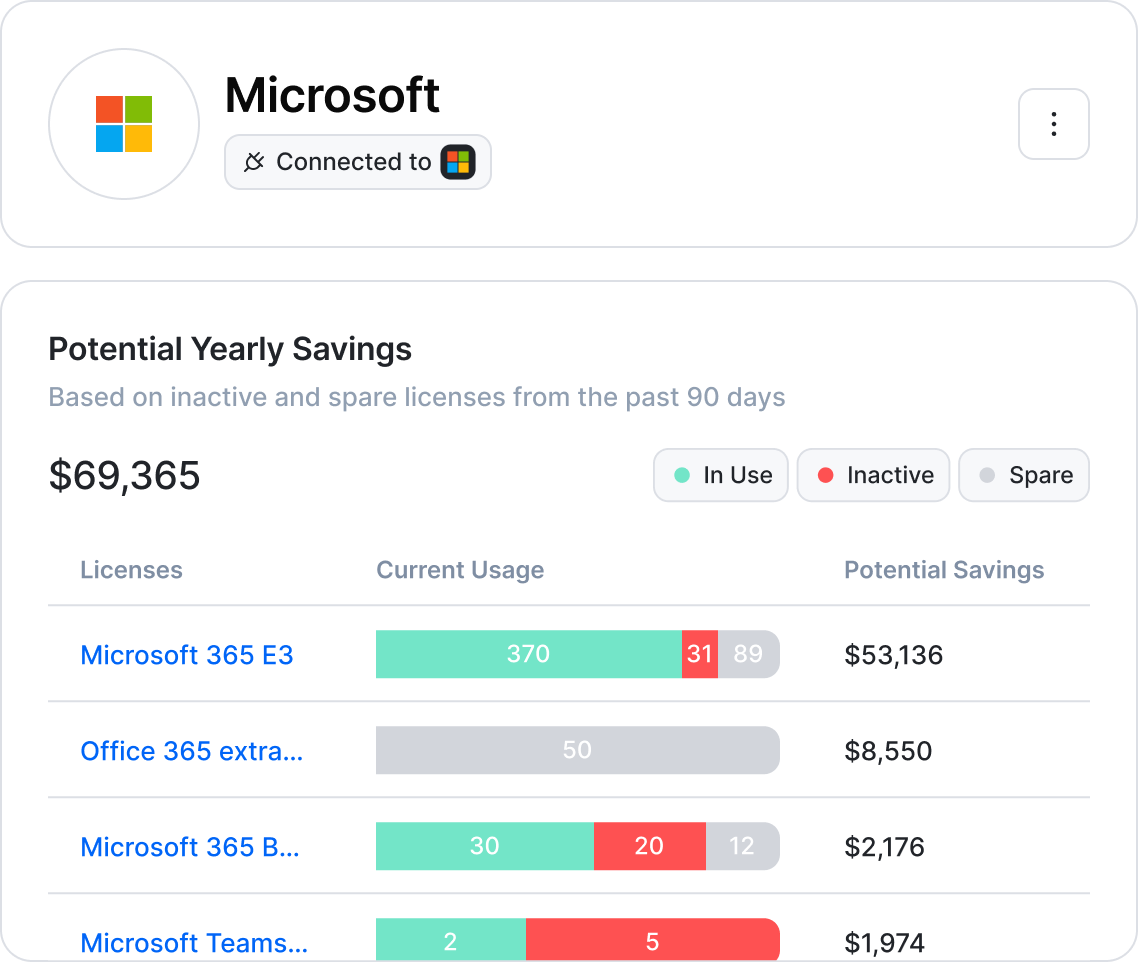
IT spend is often spread across departments, locations, and vendors. Consider whether your shortlisted IT asset management solutions can bring this information together in one place to improve visibility while helping you identify opportunities to reduce costs.
Look for features that proactively flag spend that needs attention, such as upcoming renewals, unused or unassigned licenses, duplicate subscriptions, and assets that could be recovered or redeployed instead of replaced.
This, in turn, makes it easier to build an internal business case with your finance team by demonstrating the platform’s own return on investment (ROI).
For example, Setyl helps IT teams track hardware and software spend by department, location, legal entity, and more, while identifying savings. Setyl customers have reduced SaaS spend by up to 25% and save thousands of dollars, pounds, and euros a year through better license and hardware management.
15. What support and customer success services are included?
When something goes wrong, or when you simply have a quick question, how much support will you receive from the vendor? Can you expect help during onboarding and throughout the length of your contract?
Some ITAM tools provide a knowledge base and expect customers to manage implementation and administration themselves, with potentially long waits for responses to support tickets. Others provide dedicated onboarding assistance, one-on-one training, and faster access to support.
Consider what level of support is included in the standard price, how support is delivered, expected response times, and whether you have access to people who understand your specific setup. It is also worth checking whether implementation support ends after launch or continues as your requirements evolve.
For example, Setyl includes implementation assistance and unlimited human support with every plan, including via direct messaging and one-on-one calls. Additional managed service options include a dedicated Setyl expert, managed onboarding, and ongoing data maintenance.
16. Who is the ITAM platform built for?
Is your shortlisted IT asset management software designed for organizations like yours? Or are you buying a solution built for very different needs or levels of complexity?
The best IT asset management platform for a 100-person organization is often not the best solution for a 100,000-person enterprise. Likewise, a highly complex enterprise ITAM platform can introduce unnecessary cost, implementation time, and administrative overhead for a midsize organization.
Take a look at the software vendors’ featured customers and case studies, and ask them who their typical customers are, including:
- Organization size
- Number and types of assets
- Needs and challenges, such as operational, compliance, cost, or industry-specific requirements
- Internal IT resources and expertise
- Number of locations and offices
Consider also whether the ITAM software’s roadmap aligns with where your organization is heading and whether the tool can scale with you without introducing unnecessary complexity or limitations.
For example, the Setyl IT asset management software is designed for IT teams in midsize and large organizations (80 to 5,000 employees) that are looking to automate and scale operations, reduce IT spend, and/or stay audit-ready. The platform focuses on comprehensive asset management features, automations, and integrations with a low implementation and learning burden.
Ready to evaluate your ITAM options?
Choosing an IT asset management platform is about more than finding the longest feature list or the lowest headline price. The right solution should fit the way your organization operates today, reduce manual work, cut wasted IT spend, and continue to deliver value as your asset estate and requirements grow.
One of the best ways to assess whether a software platform is right for you is to see it in practice via a free trial, allowing you to test the tool with your own assets, requirements, and workflows.
Request your free demo and trial of Setyl — designed for midsize and large organizations looking for comprehensive IT asset management functionality without the complexity of traditional enterprise solutions.
Plus, read stories from customers who explain why they chose Setyl and why it works for them.

