New features for Fall 2026
Discover our new MCP connector, updated menu, Atlassian, Autodesk & CDW integrations, Teams, and more.
Last updated
September 23, 2026
Automate routine ITAM work, improve IT spend visibility, and organize asset data around your specific needs with our Q3 releases, including:
- Complete tasks faster with our AI MCP connector
- Find what you need more easily in Setyl
- Sync license and usage data from Atlassian and Autodesk
- Organize your users, assets, and applications into Teams
- Connect Setyl to CDW US and CDW Canada
Have a question about these new features and integrations? Book a call with the team — we’re always happy to help.
1. Complete tasks faster with our AI MCP connector
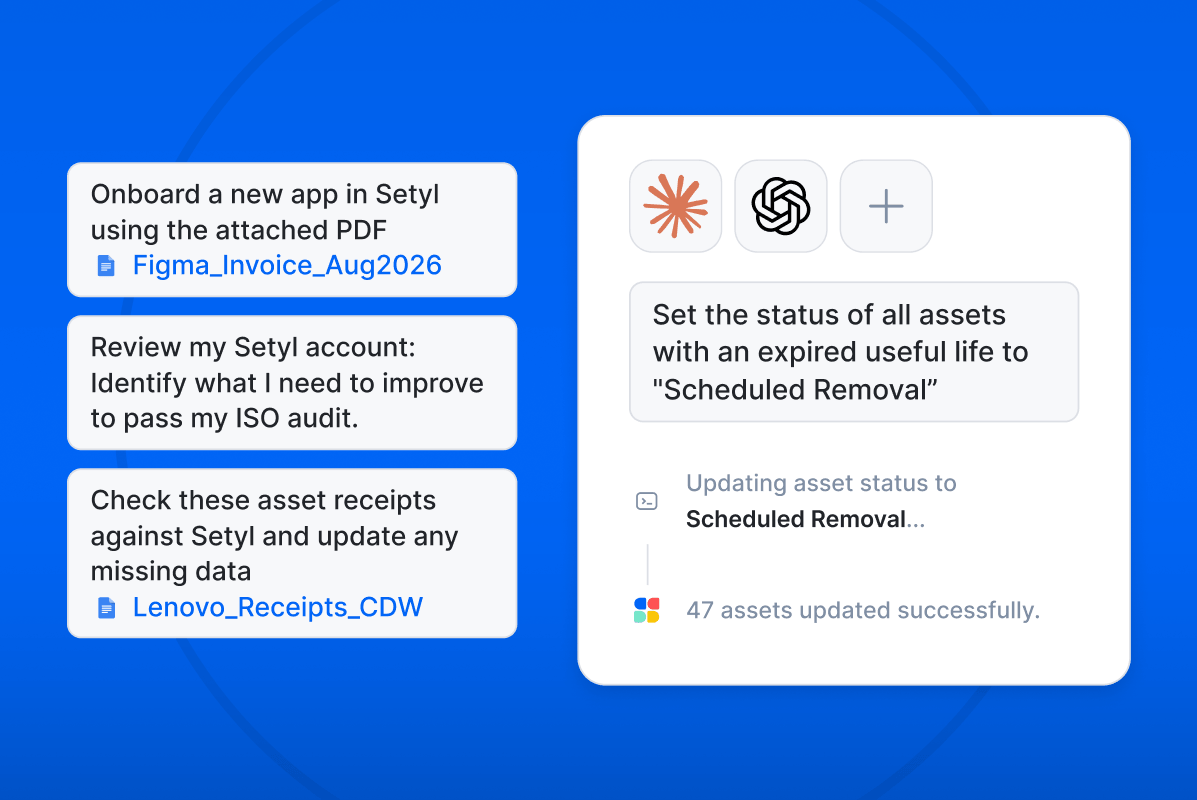
Connect Setyl to your preferred AI platform via MCP to query data, take action, and generate insights in seconds.
You can now use Claude, ChatGPT, and other MCP-supported AI platforms to work with your Setyl data and complete tasks using natural-language instructions. This helps you automate routine work, reduce manual effort, and get more done in less time.
The MCP connector is particularly useful for tasks such as:
- Making bulk updates in Setyl
- Extracting information from PDF contracts and receipts and importing it into Setyl
- Generating custom reports
- Building workflows
- Auditing your Setyl data
- Generating recommendations and insights
- Identifying inconsistencies and opportunities to improve your data
Learn more about our new MCP connector including example prompts.
To get started, head to AI MCP on the left-hand menu of your account to enable the functionality, make the connection, and review active connections. You can connect Setyl to Claude through the Claude Directory, or see our MCP documentation for other AI platforms.
2. Find what you need more easily in Setyl
We’ve updated the left-hand navigation menu in Setyl to make it easier to find what you need, including adding a dedicated view for Finance teams.
What's changed:
- Organization, People, Assets, and Apps now sit under Register, with related menu items organized underneath.
- Reports now sits under Insights.
- AI MCP now has a shortcut in the lower menu, giving you quick access to connect your AI tool and review active connections.
- We added a dedicated Finance view under Insights, consolidating all financial reports in one place. Go to Settings > Company Settings > User Permissions to give relevant team members access to this view.
Nothing has been removed; every feature is still there. We simply reorganized the navigation to make things easier to find and prepare for what’s coming next 👀
3. Sync license and usage data from Atlassian and Autodesk
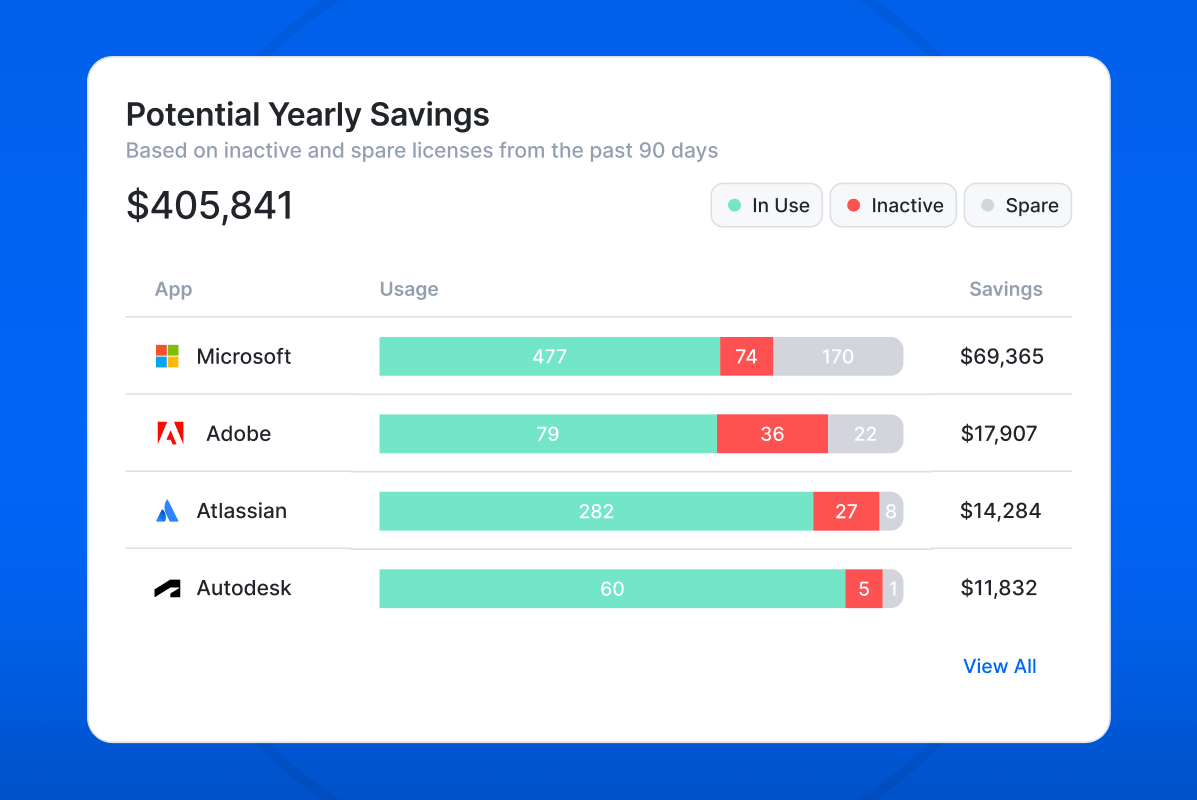
Automatically track license usage and calculate how much you could save with our new Atlassian and Autodesk (beta) license intelligence integrations.
The integrations import license names, seat counts, assignees, and user activity into Setyl. Setyl then flags inactive and unused licenses, and calculates potential savings, helping you cancel what you no longer need ahead of your next renewal.
Learn more about our license intelligence and rightsizing functionality (available to customers on the Advanced plan), and navigate to Settings > Integrations to connect your applications.
4. Organize your users, assets, and applications into Teams
Group users, assets, and software applications into Teams to manage your assets and attribute costs according to your organization’s specific needs and setup.
In addition to Departments, Locations, Legal Entities, and Groups, you can now categorize People and their assets, or individual Assets and Apps into Teams. Use Teams as cost centers, to define project teams, or in any other way that fits how you categorize your assets and spend.
Teams can be assigned manually or populated through field imports from integrations such as Microsoft and Okta.
Find and manage Teams under Register > Organization, and go to Insights > Reports > Teams to view a breakdown of spend for each Team.
5. Connect Setyl to CDW US and CDW Canada
Automate IT asset tracking by connecting your CDW US or CDW Canada account to Setyl.
We’ve expanded our asset discovery integrations to include more reseller connections. These new out‑of‑the‑box integrations automatically create purchased assets in Setyl.
Browse all MDM, RMM, cybersecurity, reseller, and other asset discovery integrations, and go to Settings > Integrations in your Setyl account to make the connection.
We hope you find these new releases useful — as always, let us know if you have any feedback and be sure to also share your ideas for new features on the Roadmap in your Setyl account.
More Setyl news and updates
- Discover our new features for Summer 2026 and Spring 2026.
- Hear from our CEO about our plans for the upcoming year as we celebrate our 6th birthday.
- New to Setyl? Watch our 90-second video for a quick overview.